Group Activity Report
Report Parameters
|
Field |
Description |
|---|---|
|
Report Name |
The name of the report. |
|
Start Date |
The start date from when the data must be considered for generating the report. |
|
End Date |
The end date until when the data must be considered for generating the report. |
|
Definite |
The report includes the details of reservations with definite reservation status. |
|
Tentative |
The report includes the details of reservations with tentative reservation status. |
|
Prospect |
The report includes the details of reservations with prospect reservation status. |
|
Booking ID & Meeting Name |
Select a preferred group from the drop-down list. The options in the drop-down list will be displayed based on the start and end dates selected for report generation. |
|
Include Day Blocks |
By default, the flag will be disabled. |
|
Include Shoulder Dates |
By default, the flag will be disabled. This flag will be displayed only when the Allow Shoulder Dates for Groups flag in the Group Defaults screen is enabled. |
Sample Report
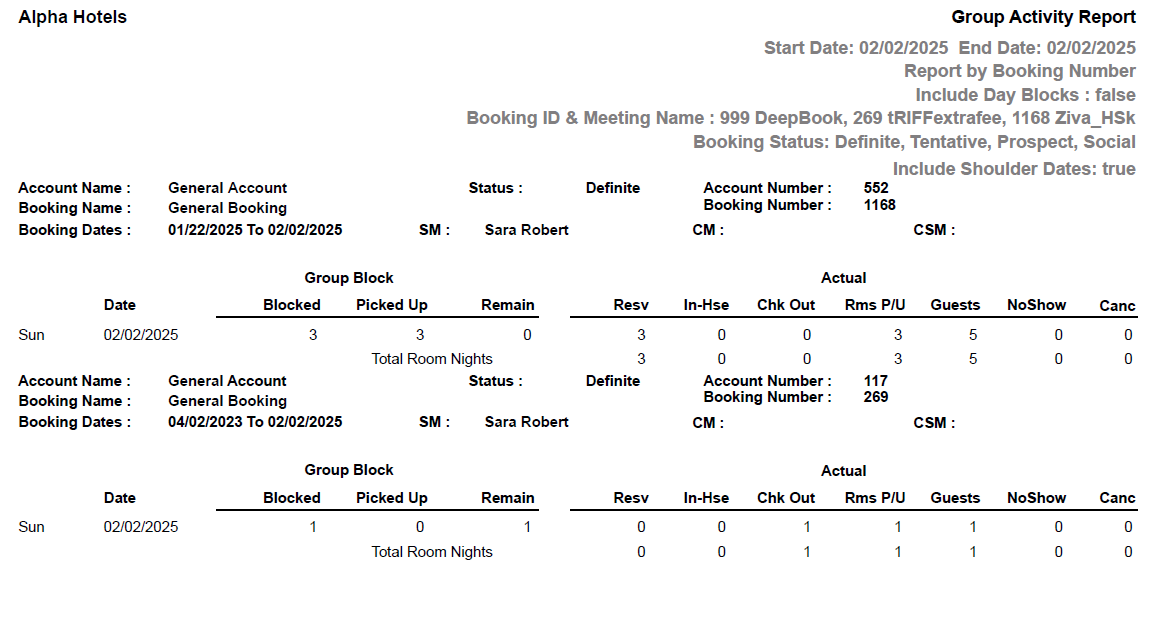
Report Fields
|
Field |
Description |
|---|---|
|
Account Name |
The name of the account associated with a group. |
|
Account Number |
The account number associated with a group. |
|
Booking Name |
The name of the booking made by the group. |
|
Booking Number |
Unique number of the booking associated with the group. |
|
Booking Dates |
The date range for which the booking has been made. |
|
Status |
The status of the reservation. |
|
SM |
User ID of sales manager. |
|
Date |
The start date of the reservation. |
|
Group Block |
|
|
Blocked |
Number of rooms blocked by the group. |
|
Picked Up |
Number of rooms picked up by the group. |
|
Remain |
The remaining number of rooms. The difference between the number of blocked and picked up rooms. |
|
Actual |
|
|
Resv |
Number of rooms reserved. |
|
In-Hse |
The number of in-house reservations is displayed. |
|
Chk Out |
Number of rooms checked out. |
|
Rms P/U |
Number of rooms picked up. |
|
Guests |
Number of guests. |
|
NoShow |
Number of no-show reservations. |
|
Canc |
Number of cancellations raised. |